Today's Dental
  • About Us
    • About Us
    • Our Dentists
    • Centralized Support Services
    • Proven Process
    • Culture
    • Join Our Team
    • Blog
  • Locations
    • Aksarben
    • Bellevue
    • Elkhorn
    • Fremont
    • Millard
    • Tranquility Park
  • Services
    • Family Dentistry
      • Preventive Care Services
      • Periodontal Care
      • Restorative Care Services
        • Tooth Extraction
      • Sedation Dentistry
      • Dental Visit Anxiety
      • Paying for Dental Care
    • Pediatric Dental Care
      • Childs First Visit
      • Preventative Care for Children
      • Comfortable Environment
    • Cosmetic Dentistry and Orthodontics
      • Teeth Whitening
      • Dental Crowns & Bridges
      • Veneers
      • Invisalign®
      • Dentures & Dental Implants
    • Urgent & Emergency Care
      • Dental Emergency
      • Urgent Care Services
      • Text-a-Dentist
  • Dental Issues
    • Bad Breath/Halitosis
    • Cavities
    • Chipped and Broken Tooth Treatment
    • Dark Teeth
    • Dental Anxiety
    • Gum Disease
    • Malocclusion
    • Root Canal
    • Soft Teeth
    • Tooth Infection
    • Tooth Pain
    • Wisdom Teeth
  • Patient Resources
    • Smile Care Plan
    • Financing
    • Insurance Checker
    • Patient Forms
    • Post Operative Instructions
  • Patient Reviews
  • Contact
  • Pay Online
  • Schedule Your Appointment
  • Menu Menu
Kids In School

A Healthy Smile, A Confident Student: The Overlooked Key to Academic Success

A Healthy Smile, A Confident Student: The Overlooked Key to Academic Success

Key Takeaways

  • Self-Esteem is Tied to a Smile: Dental issues like crooked or discolored teeth can significantly lower a student’s confidence, leading to social anxiety and withdrawal, especially during the crucial teen years.
  • Participation Suffers: Students who are self-conscious about their teeth are often hesitant to speak, read aloud, or present in class, which can negatively impact their academic performance and engagement.
  • Pain Kills Focus: Chronic dental pain from cavities or infections is a major physical distraction that makes it difficult to concentrate, disrupts sleep, and can lead to missed school days.
  • Proactive Care is an Academic Tool: Investing in routine dental care is a direct investment in your child’s well-being and a powerful tool for helping them succeed in the classroom.

For parents and educators, the back-to-school season is often a flurry of new supplies, schedules, and goals. We focus on ensuring students have the right tools to succeed, from laptops to textbooks. But one of the most critical tools for success is one that’s often overlooked: a healthy, confident smile. At Today’s Dental, we know that oral health plays a huge, often underestimated role in a student’s self-esteem, classroom participation, and ability to focus—especially for older kids and teens navigating the social and academic pressures of school. 

Smiles and Self-Esteem: The Confidence Connection
Smiles And Self Esteem

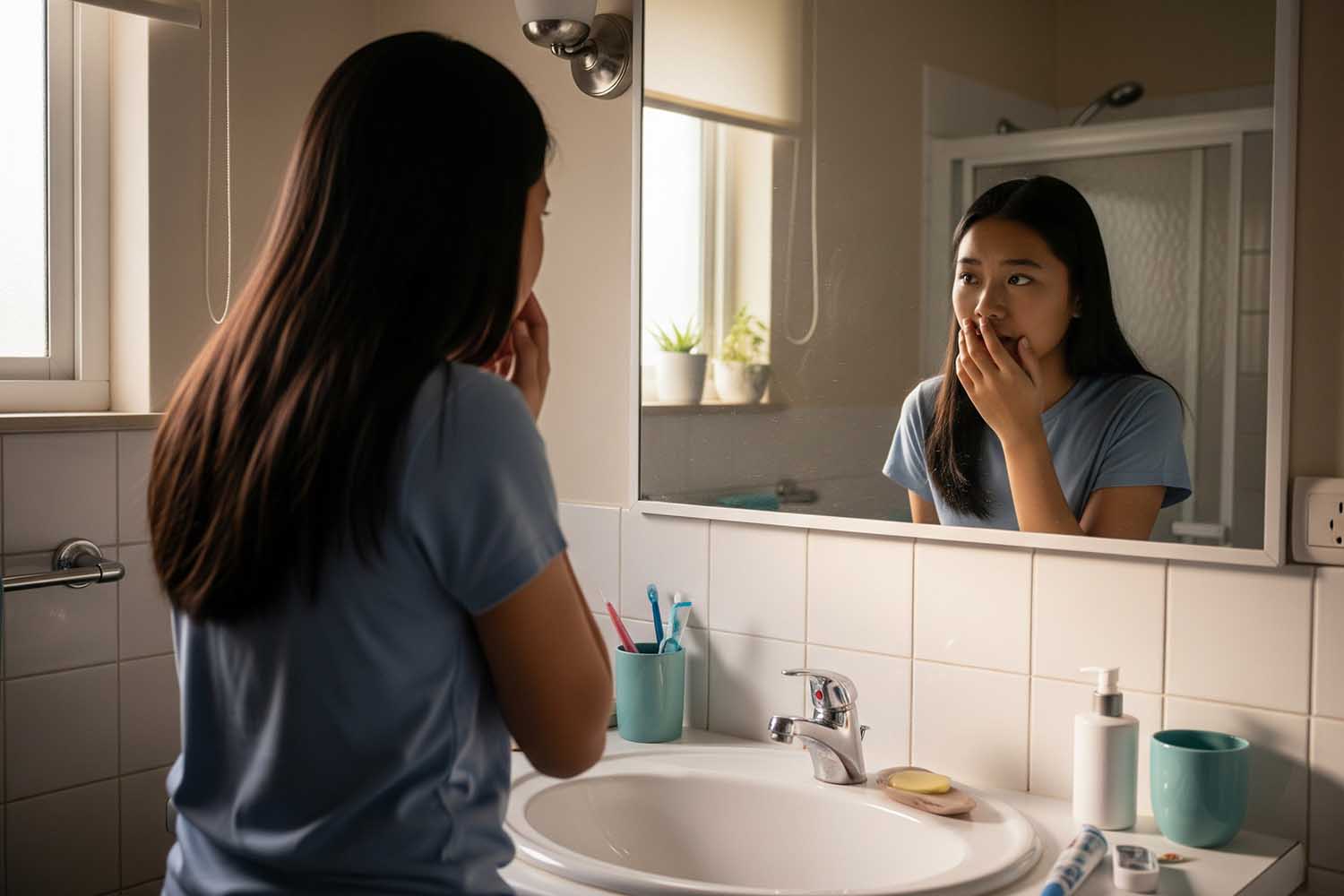
The teenage years are a time of intense self-awareness. Appearance becomes a central part of identity, and a person’s smile is front and center in every interaction. When a student is dealing with dental issues—such as crooked teeth, discoloration, decay, or persistent bad breath—it can create a powerful sense of embarrassment and shame. This isn’t just about vanity; it’s about feeling comfortable in one’s own skin.

A student who is ashamed of their smile may become hesitant to express themselves freely. They might cover their mouth when they laugh, avoid smiling in photos, or shy away from social situations. This hesitation can quickly spiral into social anxiety and low confidence, impacting their ability to build friendships and engage with peers. A healthy smile, however, empowers a student to face the world with confidence, knowing their first impression is a positive one.

Participation in the Classroom: The Risk of Speaking Up

Classroom Participation

That same self-consciousness can have a profound impact on academic performance. Imagine being asked to read a passage aloud or present a project in front of the class. For a student worried about how their teeth look or if their breath is noticeable, these routine activities can feel incredibly risky. The fear of judgment can lead them to avoid participating altogether. They may not raise their hand to answer questions, even when they know the answer, or they may mumble through presentations.

This reluctance affects more than just participation grades. It impacts how they are perceived by teachers and classmates and can limit their engagement with the learning process. In some cases, untreated dental problems like misaligned teeth can cause speech difficulties, further discouraging a student from speaking up and sharing their ideas.

Focus in the Classroom: The Distraction of Pain

Focus And Dental Pain

Beyond the social and emotional impact, poor oral health can be a direct physical barrier to learning. A persistent toothache isn’t just a minor inconvenience; it’s a chronic, draining distraction. The constant, nagging pain from a cavity, an infection, or jaw discomfort can make it nearly impossible for a student to concentrate on a math problem, absorb a history lesson, or complete their homework.

Furthermore, dental pain often disrupts sleep, leaving a student tired and unfocused the next day. It can also lead to missed school days for emergency dental appointments, causing them to fall behind academically. By addressing dental issues proactively, we can eliminate this source of pain and distraction, allowing students to dedicate their full attention to their education.

Investing in your child’s oral health is an investment in their future. Regular check-ups, cleanings, and addressing issues like alignment or decay are essential steps. At Today’s Dental, we partner with families to build the foundation for a lifetime of healthy smiles, ensuring that every student can walk into the classroom with the confidence and focus they need to thrive.

Give Your Child the Confidence to Shine at Today’s Dental

Contact Us

Embrace Your Smile: Expert Care for Hypodontia at Today’s Dental

Contact Us

Ready for Your Next Visit?

Schedule your dental appointment today and take the first step toward a healthier smile.

Schedule an Appointment

or call us at (402) 333-6288

Today'S Dental Logo

Today’s Dental began in 1980 with one location. It was founded with the goal of providing high-quality, safe, convenient, and comfortable dental care in a family-friendly setting.

Related Services

  • Cosmetic Dentistry and Orthodontics
  • Teeth Whitening
  • Invisalign®
  • Services
  • Preventive Care Services

Our Locations

  • Aksarben2141 S. 63rd Street, Omaha
  • Bellevue2207 Longo Drive, Bellevue
  • Millard14406 Harrison St., Omaha
  • Tranquility12322 Emmet St., Omaha
  • Elkhorn20211 Manderson St., Elkhorn
  • Fremont1689 E 23 Street, Fremont

Today’s Dental

We’re committed to working with you and your family to create a comfortable, stress-free, and exceptionally rewarding dental care experience.

Locations

  • Millard
  • Tranquility Park
  • Elkhorn
  • Aksarben
  • Bellevue
  • Fremont

Patient Resources

  • Smile Care Plan
  • Financing
  • Patient Forms
  • Reviews
  • Open Accessibility
  • Privacy Policy

Blog

Pay Online

Join Our Team

Today’s Dental

We’re committed to working with you and your family to create a comfortable, stress-free, and exceptionally rewarding dental care experience.

Locations

  • Millard
  • Tranquility Park
  • Elkhorn
  • Aksarben
  • Bellevue
  • Fremont

Patient Resources

  • Smile Care Plan
  • Financing
  • Patient Forms
  • Reviews
  • Open Accessibility
  • Privacy Policy

Blog

Pay Online

Join Our Team

© Copyright 2026 – Omaha Dentistry | Website design and SEO provided by Robben Media

Link to: Thinning Tooth Enamel: Causes, Symptoms, and Effective Treatments Link to: Thinning Tooth Enamel: Causes, Symptoms, and Effective Treatments Thinning Tooth Enamel: Causes, Symptoms, and Effective TreatmentsThinning Tooth Enamel Causes, Symptoms, And Effective TreatmentsLink to: Toothache Myths Debunked: What Really Helps Dental Pain Link to: Toothache Myths Debunked: What Really Helps Dental Pain Toothache Myths Debunked What Really Helps Dental PainToothache Myths Debunked: What Really Helps Dental Pain
Scroll to top Scroll to top Scroll to top
Translate »
Accessibility
Accessibility modes
Epilepsy Safe Mode
Dampens color and removes blinks
This mode enables people with epilepsy to use the website safely by eliminating the risk of seizures that result from flashing or blinking animations and risky color combinations.
Visually Impaired Mode
Improves website's visuals
This mode adjusts the website for the convenience of users with visual impairments such as Degrading Eyesight, Tunnel Vision, Cataract, Glaucoma, and others.
Cognitive Disability Mode
Helps to focus on specific content
This mode provides different assistive options to help users with cognitive impairments such as Dyslexia, Autism, CVA, and others, to focus on the essential elements of the website more easily.
ADHD Friendly Mode
Reduces distractions and improve focus
This mode helps users with ADHD and Neurodevelopmental disorders to read, browse, and focus on the main website elements more easily while significantly reducing distractions.
Blindness Mode
Allows using the site with your screen-reader
This mode configures the website to be compatible with screen-readers such as JAWS, NVDA, VoiceOver, and TalkBack. A screen-reader is software for blind users that is installed on a computer and smartphone, and websites must be compatible with it.
Online Dictionary
    Readable Experience
    Content Scaling
    Default
    Text Magnifier
    Readable Font
    Dyslexia Friendly
    Highlight Titles
    Highlight Links
    Font Sizing
    Default
    Line Height
    Default
    Letter Spacing
    Default
    Left Aligned
    Center Aligned
    Right Aligned
    Visually Pleasing Experience
    Dark Contrast
    Light Contrast
    Monochrome
    High Contrast
    High Saturation
    Low Saturation
    Adjust Text Colors
    Adjust Title Colors
    Adjust Background Colors
    Easy Orientation
    Mute Sounds
    Hide Images
    Hide Emoji
    Reading Guide
    Stop Animations
    Reading Mask
    Highlight Hover
    Highlight Focus
    Big Dark Cursor
    Big Light Cursor
    Cognitive Reading
    Virtual Keyboard
    Navigation Keys
    Voice Navigation

    Today's Dental

    Accessibility Statement

    • omahadentists.net
    • June 9, 2026

    Compliance status

    We firmly believe that the internet should be available and accessible to anyone, and are committed to providing a website that is accessible to the widest possible audience, regardless of circumstance and ability.

    To fulfill this, we aim to adhere as strictly as possible to the World Wide Web Consortium’s (W3C) Web Content Accessibility Guidelines 2.1 (WCAG 2.1) at the AA level. These guidelines explain how to make web content accessible to people with a wide array of disabilities. Complying with those guidelines helps us ensure that the website is accessible to all people: blind people, people with motor impairments, visual impairment, cognitive disabilities, and more.

    This website utilizes various technologies that are meant to make it as accessible as possible at all times. We utilize an accessibility interface that allows persons with specific disabilities to adjust the website’s UI (user interface) and design it to their personal needs.

    Additionally, the website utilizes an AI-based application that runs in the background and optimizes its accessibility level constantly. This application remediates the website’s HTML, adapts Its functionality and behavior for screen-readers used by the blind users, and for keyboard functions used by individuals with motor impairments.

    If you’ve found a malfunction or have ideas for improvement, we’ll be happy to hear from you. You can reach out to the website’s operators by using the following email

    Screen-reader and keyboard navigation

    Our website implements the ARIA attributes (Accessible Rich Internet Applications) technique, alongside various different behavioral changes, to ensure blind users visiting with screen-readers are able to read, comprehend, and enjoy the website’s functions. As soon as a user with a screen-reader enters your site, they immediately receive a prompt to enter the Screen-Reader Profile so they can browse and operate your site effectively. Here’s how our website covers some of the most important screen-reader requirements, alongside console screenshots of code examples:

    1. Screen-reader optimization: we run a background process that learns the website’s components from top to bottom, to ensure ongoing compliance even when updating the website. In this process, we provide screen-readers with meaningful data using the ARIA set of attributes. For example, we provide accurate form labels; descriptions for actionable icons (social media icons, search icons, cart icons, etc.); validation guidance for form inputs; element roles such as buttons, menus, modal dialogues (popups), and others. Additionally, the background process scans all the website’s images and provides an accurate and meaningful image-object-recognition-based description as an ALT (alternate text) tag for images that are not described. It will also extract texts that are embedded within the image, using an OCR (optical character recognition) technology. To turn on screen-reader adjustments at any time, users need only to press the Alt+1 keyboard combination. Screen-reader users also get automatic announcements to turn the Screen-reader mode on as soon as they enter the website.

      These adjustments are compatible with all popular screen readers, including JAWS and NVDA.

    2. Keyboard navigation optimization: The background process also adjusts the website’s HTML, and adds various behaviors using JavaScript code to make the website operable by the keyboard. This includes the ability to navigate the website using the Tab and Shift+Tab keys, operate dropdowns with the arrow keys, close them with Esc, trigger buttons and links using the Enter key, navigate between radio and checkbox elements using the arrow keys, and fill them in with the Spacebar or Enter key.Additionally, keyboard users will find quick-navigation and content-skip menus, available at any time by clicking Alt+1, or as the first elements of the site while navigating with the keyboard. The background process also handles triggered popups by moving the keyboard focus towards them as soon as they appear, and not allow the focus drift outside it.

      Users can also use shortcuts such as “M” (menus), “H” (headings), “F” (forms), “B” (buttons), and “G” (graphics) to jump to specific elements.

    Disability profiles supported in our website

    • Epilepsy Safe Mode: this profile enables people with epilepsy to use the website safely by eliminating the risk of seizures that result from flashing or blinking animations and risky color combinations.
    • Visually Impaired Mode: this mode adjusts the website for the convenience of users with visual impairments such as Degrading Eyesight, Tunnel Vision, Cataract, Glaucoma, and others.
    • Cognitive Disability Mode: this mode provides different assistive options to help users with cognitive impairments such as Dyslexia, Autism, CVA, and others, to focus on the essential elements of the website more easily.
    • ADHD Friendly Mode: this mode helps users with ADHD and Neurodevelopmental disorders to read, browse, and focus on the main website elements more easily while significantly reducing distractions.
    • Blindness Mode: this mode configures the website to be compatible with screen-readers such as JAWS, NVDA, VoiceOver, and TalkBack. A screen-reader is software for blind users that is installed on a computer and smartphone, and websites must be compatible with it.
    • Keyboard Navigation Profile (Motor-Impaired): this profile enables motor-impaired persons to operate the website using the keyboard Tab, Shift+Tab, and the Enter keys. Users can also use shortcuts such as “M” (menus), “H” (headings), “F” (forms), “B” (buttons), and “G” (graphics) to jump to specific elements.

    Additional UI, design, and readability adjustments

    1. Font adjustments – users, can increase and decrease its size, change its family (type), adjust the spacing, alignment, line height, and more.
    2. Color adjustments – users can select various color contrast profiles such as light, dark, inverted, and monochrome. Additionally, users can swap color schemes of titles, texts, and backgrounds, with over seven different coloring options.
    3. Animations – person with epilepsy can stop all running animations with the click of a button. Animations controlled by the interface include videos, GIFs, and CSS flashing transitions.
    4. Content highlighting – users can choose to emphasize important elements such as links and titles. They can also choose to highlight focused or hovered elements only.
    5. Audio muting – users with hearing devices may experience headaches or other issues due to automatic audio playing. This option lets users mute the entire website instantly.
    6. Cognitive disorders – we utilize a search engine that is linked to Wikipedia and Wiktionary, allowing people with cognitive disorders to decipher meanings of phrases, initials, slang, and others.
    7. Additional functions – we provide users the option to change cursor color and size, use a printing mode, enable a virtual keyboard, and many other functions.

    Browser and assistive technology compatibility

    We aim to support the widest array of browsers and assistive technologies as possible, so our users can choose the best fitting tools for them, with as few limitations as possible. Therefore, we have worked very hard to be able to support all major systems that comprise over 95% of the user market share including Google Chrome, Mozilla Firefox, Apple Safari, Opera and Microsoft Edge, JAWS and NVDA (screen readers).

    Notes, comments, and feedback

    Despite our very best efforts to allow anybody to adjust the website to their needs. There may still be pages or sections that are not fully accessible, are in the process of becoming accessible, or are lacking an adequate technological solution to make them accessible. Still, we are continually improving our accessibility, adding, updating and improving its options and features, and developing and adopting new technologies. All this is meant to reach the optimal level of accessibility, following technological advancements. For any assistance, please reach out to