
Today's Dental
  • About Us
    • About Us
    • Our Dentists
    • Centralized Support Services
    • Proven Process
    • Culture
    • Join Our Team
    • Blog
  • Locations
    • Aksarben
    • Bellevue
    • Elkhorn
    • Fremont
    • Millard
    • Tranquility Park
  • Services
    • Family Dentistry
      • Preventive Care Services
      • Periodontal Care
      • Restorative Care Services
        • Tooth Extraction
      • Sedation Dentistry
      • Dental Visit Anxiety
      • Paying for Dental Care
    • Pediatric Dental Care
      • Childs First Visit
      • Preventative Care for Children
      • Comfortable Environment
    • Cosmetic Dentistry and Orthodontics
      • Teeth Whitening
      • Dental Crowns & Bridges
      • Veneers
      • Invisalign®
      • Dentures & Dental Implants
    • Urgent & Emergency Care
      • Dental Emergency
      • Urgent Care Services
      • Text-a-Dentist
  • Dental Issues
    • Bad Breath/Halitosis
    • Cavities
    • Chipped and Broken Tooth Treatment
    • Dark Teeth
    • Dental Anxiety
    • Gum Disease
    • Malocclusion
    • Root Canal
    • Soft Teeth
    • Tooth Infection
    • Tooth Pain
    • Wisdom Teeth
  • Patient Resources
    • Smile Care Plan
    • Financing
    • Insurance Checker
    • Patient Forms
    • Post Operative Instructions
  • Patient Reviews
  • Contact
  • Pay Online
  • Schedule Your Appointment
  • Menu Menu
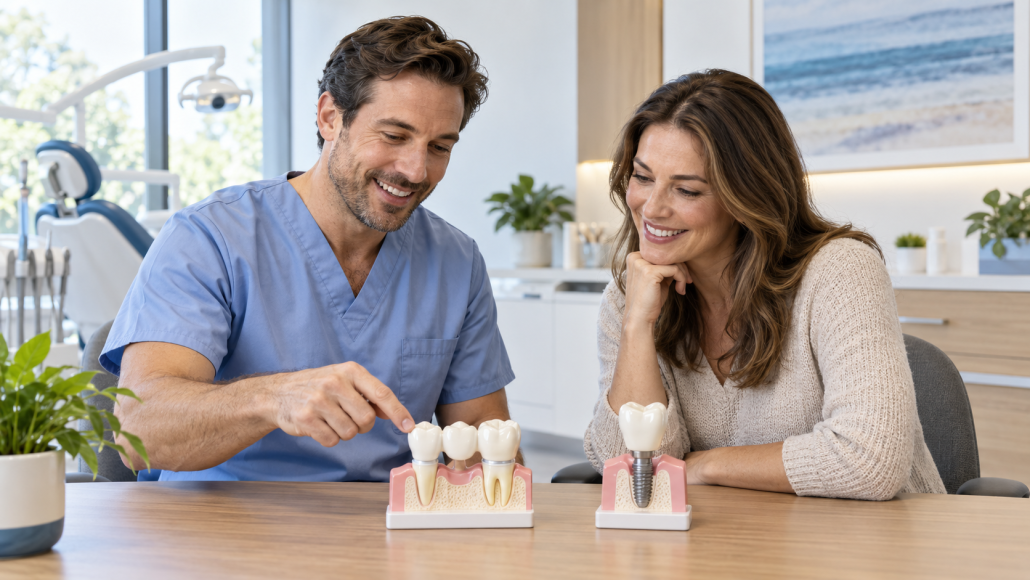
A Dental Professional Points To A Three-Tooth Bridge Model Beside A Single-Tooth Implant Model While Discussing Missing-Tooth Replacement Options With A Patient.

Dental Bridge vs. Implant: Questions to Ask Before Replacing a Missing Tooth

Losing a tooth as an adult comes with a dozen decisions, and the biggest is how to fill the gap. The two most common fixed options (permanent, non-removable replacements) are a dental bridge and a dental implant, and patients often arrive at our office asking which one is “better.” The honest answer is that neither is universally better; each solves the problem differently, and the right choice depends on your teeth, your health, your timeline, and your priorities.

Rather than telling you which treatment to pick, this guide walks through how each option works and the questions worth asking your dentist before you decide. Treatment selection should always happen in the exam chair, not in a blog post, but we hope this guide helps you go to the dental office more prepared!

How Bridges and Implants Actually Work

A dental bridge replaces a missing tooth by anchoring a replacement tooth to the neighboring teeth. Those adjacent teeth are fitted with crowns, and the replacement tooth is suspended between them, bridging the gap. Like a suspension bridge anchors to either side of a river, this bridge uses your teeth as an anchor! Bridges have been used for decades, do not require surgery, and can typically be completed in a couple of visits.

A dental implant replaces the missing tooth at the root. A small titanium post is placed in the jawbone, where it heals and integrates over several months, and a crown is attached on top. An implant stands alone without relying on neighboring teeth, and it acts much like a natural tooth once fully restored.

As the American Dental Association explains for bridges and implants, both are well-established ways to replace missing teeth. They simply take different paths to the same goal.

Questions About Your Teeth and Health

The biggest factors in the bridge-versus-implant decision are the ones specific to your mouth. Ask:

  • Are my neighboring teeth strong enough to support a bridge? A bridge depends on the teeth next to the gap. If they are healthy, that may be straightforward; if they already have large fillings or crowns, the calculation changes.
  • Is my jawbone a good candidate for an implant? Implants need a certain amount of healthy bone to anchor. Your dentist can evaluate this.
  • How does my overall health affect each option? Healing, medications, and certain health conditions can influence which treatment fits. Share your full health history; it shapes the recommendation.
  • What is happening with my gums? Healthy gums matter for both options, and any gum disease needs attention first.

Questions About Timeline and Process

Bridges and implants differ most obviously in how long they take:

  • How many visits does each option involve? A bridge is usually finished in two or three visits over a few weeks. An implant involves placement, a healing period of several months while the bone integrates, and then the crown.
  • What does the healing process look like? Implant placement is a surgical procedure, and it is fair to ask about discomfort, recovery time, and follow-up care.
  • Is there a temporary tooth in the meantime? There are options to have something to fill the gap while you are waiting to complete treatment! Ask how each option handles appearance and function during the treatment window.

Questions About Long-Term Care and Longevity

Both bridges and implants are long-term solutions, but their maintenance differs:

  • How do I clean a bridge? Bridges require extra attention under the replacement tooth, often with floss threaders or small brushes. Ask for a demonstration.
  • How do I care for an implant? Implants are cared for much like natural teeth, with brushing, flossing, and regular checkups, though the gum around an implant deserves special attention.
  • What happens to the neighboring teeth with each option? A bridge permanently reshapes the adjacent teeth to hold crowns. An implant leaves them untouched. Some patients care about this a great deal; others less so. It is worth knowing.
  • What long-term follow-up do you recommend? Either option benefits from regular exams so your dentist can monitor it over the years.

Questions About Cost and Coverage

Cost is a legitimate part of the decision, and it varies with each situation. Ask for a written estimate for each option, ask what your dental insurance contributes toward each, and ask about phased treatment if you are considering an implant but need to spread the cost over time. Dental offices answer these questions every day, and a clear estimate beats a surprise every time.

In Today’s Dental offices, our teams are happy to give you an estimate of cost. Sometimes, patients ask for a preauthorization. A preauthorization is a submission in writing to your insurance company, in order to have a more clear idea of what they will pay. Our team is happy to help with this as well! However, these will always be just estimates. The best way to know what your insurance company will cover is always to speak directly to them. We also can connect patients with a financing plan!

Questions That Bring It All Together

When you sit down with your dentist, two questions pull everything above into focus:

  • Given my specific exam, which option would you recommend for me, and why?
  • If I chose the other option, what would concern you?

The answers turn general information into personal guidance. The team at Today’s Dental evaluates each patient’s whole picture before recommending a path, and both owner pages, crowns and bridges and dentures and implants, describe how each treatment works in detail.

Ready to Talk It Through?

A missing tooth is worth replacing: neighboring teeth shift, chewing changes, and confidence can take a hit. Whether a bridge or an implant ends up being right for you, the decision starts with an exam and a conversation. Bring your questions; a good dental team will have answers.

If you are in the Omaha area, schedule an appointment with Today’s Dental and talk through which tooth-replacement option fits your smile, your health, and your plans.

Ready for Your Next Visit?

Schedule your dental appointment today and take the first step toward a healthier smile.

Schedule an Appointment

or call us at (402) 333-6288

Today'S Dental Logo

Today’s Dental began in 1980 with one location. It was founded with the goal of providing high-quality, safe, convenient, and comfortable dental care in a family-friendly setting.

Related Services

  • Services

Our Locations

  • Aksarben2141 S. 63rd Street, Omaha
  • Bellevue2207 Longo Drive, Bellevue
  • Millard14406 Harrison St., Omaha
  • Tranquility12322 Emmet St., Omaha
  • Elkhorn20211 Manderson St., Elkhorn
  • Fremont1689 E 23 Street, Fremont

Today’s Dental

We’re committed to working with you and your family to create a comfortable, stress-free, and exceptionally rewarding dental care experience.

Locations

  • Millard
  • Tranquility Park
  • Elkhorn
  • Aksarben
  • Bellevue
  • Fremont

Patient Resources

  • Smile Care Plan
  • Financing
  • Patient Forms
  • Reviews
  • Open Accessibility
  • Privacy Policy

Blog

Pay Online

Join Our Team

Today’s Dental

We’re committed to working with you and your family to create a comfortable, stress-free, and exceptionally rewarding dental care experience.

Locations

  • Millard
  • Tranquility Park
  • Elkhorn
  • Aksarben
  • Bellevue
  • Fremont

Patient Resources

  • Smile Care Plan
  • Financing
  • Patient Forms
  • Reviews
  • Open Accessibility
  • Privacy Policy

Blog

Pay Online

Join Our Team

© Copyright 2026 – Omaha Dentistry | Website design and SEO provided by Robben Media

Link to: Open Enrollment: What to Know Before You Buy a Self-Purchased Dental Insurance Plan Link to: Open Enrollment: What to Know Before You Buy a Self-Purchased Dental Insurance Plan Open Enrollment: What to Know Before You Buy a Self-Purchased Dental Insurance...Buy A Self-Purchased Dental Insurance Policy
Scroll to top Scroll to top Scroll to top
Translate »
  • <
  • <
Accessibility
Accessibility modes
Epilepsy Safe Mode
Dampens color and removes blinks
This mode enables people with epilepsy to use the website safely by eliminating the risk of seizures that result from flashing or blinking animations and risky color combinations.
Visually Impaired Mode
Improves website's visuals
This mode adjusts the website for the convenience of users with visual impairments such as Degrading Eyesight, Tunnel Vision, Cataract, Glaucoma, and others.
Cognitive Disability Mode
Helps to focus on specific content
This mode provides different assistive options to help users with cognitive impairments such as Dyslexia, Autism, CVA, and others, to focus on the essential elements of the website more easily.
ADHD Friendly Mode
Reduces distractions and improve focus
This mode helps users with ADHD and Neurodevelopmental disorders to read, browse, and focus on the main website elements more easily while significantly reducing distractions.
Blindness Mode
Allows using the site with your screen-reader
This mode configures the website to be compatible with screen-readers such as JAWS, NVDA, VoiceOver, and TalkBack. A screen-reader is software for blind users that is installed on a computer and smartphone, and websites must be compatible with it.
Online Dictionary
    Readable Experience
    Content Scaling
    Default
    Text Magnifier
    Readable Font
    Dyslexia Friendly
    Highlight Titles
    Highlight Links
    Font Sizing
    Default
    Line Height
    Default
    Letter Spacing
    Default
    Left Aligned
    Center Aligned
    Right Aligned
    Visually Pleasing Experience
    Dark Contrast
    Light Contrast
    Monochrome
    High Contrast
    High Saturation
    Low Saturation
    Adjust Text Colors
    Adjust Title Colors
    Adjust Background Colors
    Easy Orientation
    Mute Sounds
    Hide Images
    Hide Emoji
    Reading Guide
    Stop Animations
    Reading Mask
    Highlight Hover
    Highlight Focus
    Big Dark Cursor
    Big Light Cursor
    Cognitive Reading
    Virtual Keyboard
    Navigation Keys
    Voice Navigation

    Today's Dental

    Accessibility Statement

    • omahadentists.net
    • November 7, 2026

    Compliance status

    We firmly believe that the internet should be available and accessible to anyone, and are committed to providing a website that is accessible to the widest possible audience, regardless of circumstance and ability.

    To fulfill this, we aim to adhere as strictly as possible to the World Wide Web Consortium’s (W3C) Web Content Accessibility Guidelines 2.1 (WCAG 2.1) at the AA level. These guidelines explain how to make web content accessible to people with a wide array of disabilities. Complying with those guidelines helps us ensure that the website is accessible to all people: blind people, people with motor impairments, visual impairment, cognitive disabilities, and more.

    This website utilizes various technologies that are meant to make it as accessible as possible at all times. We utilize an accessibility interface that allows persons with specific disabilities to adjust the website’s UI (user interface) and design it to their personal needs.

    Additionally, the website utilizes an AI-based application that runs in the background and optimizes its accessibility level constantly. This application remediates the website’s HTML, adapts Its functionality and behavior for screen-readers used by the blind users, and for keyboard functions used by individuals with motor impairments.

    If you’ve found a malfunction or have ideas for improvement, we’ll be happy to hear from you. You can reach out to the website’s operators by using the following email

    Screen-reader and keyboard navigation

    Our website implements the ARIA attributes (Accessible Rich Internet Applications) technique, alongside various different behavioral changes, to ensure blind users visiting with screen-readers are able to read, comprehend, and enjoy the website’s functions. As soon as a user with a screen-reader enters your site, they immediately receive a prompt to enter the Screen-Reader Profile so they can browse and operate your site effectively. Here’s how our website covers some of the most important screen-reader requirements, alongside console screenshots of code examples:

    1. Screen-reader optimization: we run a background process that learns the website’s components from top to bottom, to ensure ongoing compliance even when updating the website. In this process, we provide screen-readers with meaningful data using the ARIA set of attributes. For example, we provide accurate form labels; descriptions for actionable icons (social media icons, search icons, cart icons, etc.); validation guidance for form inputs; element roles such as buttons, menus, modal dialogues (popups), and others. Additionally, the background process scans all the website’s images and provides an accurate and meaningful image-object-recognition-based description as an ALT (alternate text) tag for images that are not described. It will also extract texts that are embedded within the image, using an OCR (optical character recognition) technology. To turn on screen-reader adjustments at any time, users need only to press the Alt+1 keyboard combination. Screen-reader users also get automatic announcements to turn the Screen-reader mode on as soon as they enter the website.

      These adjustments are compatible with all popular screen readers, including JAWS and NVDA.

    2. Keyboard navigation optimization: The background process also adjusts the website’s HTML, and adds various behaviors using JavaScript code to make the website operable by the keyboard. This includes the ability to navigate the website using the Tab and Shift+Tab keys, operate dropdowns with the arrow keys, close them with Esc, trigger buttons and links using the Enter key, navigate between radio and checkbox elements using the arrow keys, and fill them in with the Spacebar or Enter key.Additionally, keyboard users will find quick-navigation and content-skip menus, available at any time by clicking Alt+1, or as the first elements of the site while navigating with the keyboard. The background process also handles triggered popups by moving the keyboard focus towards them as soon as they appear, and not allow the focus drift outside it.

      Users can also use shortcuts such as “M” (menus), “H” (headings), “F” (forms), “B” (buttons), and “G” (graphics) to jump to specific elements.

    Disability profiles supported in our website

    • Epilepsy Safe Mode: this profile enables people with epilepsy to use the website safely by eliminating the risk of seizures that result from flashing or blinking animations and risky color combinations.
    • Visually Impaired Mode: this mode adjusts the website for the convenience of users with visual impairments such as Degrading Eyesight, Tunnel Vision, Cataract, Glaucoma, and others.
    • Cognitive Disability Mode: this mode provides different assistive options to help users with cognitive impairments such as Dyslexia, Autism, CVA, and others, to focus on the essential elements of the website more easily.
    • ADHD Friendly Mode: this mode helps users with ADHD and Neurodevelopmental disorders to read, browse, and focus on the main website elements more easily while significantly reducing distractions.
    • Blindness Mode: this mode configures the website to be compatible with screen-readers such as JAWS, NVDA, VoiceOver, and TalkBack. A screen-reader is software for blind users that is installed on a computer and smartphone, and websites must be compatible with it.
    • Keyboard Navigation Profile (Motor-Impaired): this profile enables motor-impaired persons to operate the website using the keyboard Tab, Shift+Tab, and the Enter keys. Users can also use shortcuts such as “M” (menus), “H” (headings), “F” (forms), “B” (buttons), and “G” (graphics) to jump to specific elements.

    Additional UI, design, and readability adjustments

    1. Font adjustments – users, can increase and decrease its size, change its family (type), adjust the spacing, alignment, line height, and more.
    2. Color adjustments – users can select various color contrast profiles such as light, dark, inverted, and monochrome. Additionally, users can swap color schemes of titles, texts, and backgrounds, with over seven different coloring options.
    3. Animations – person with epilepsy can stop all running animations with the click of a button. Animations controlled by the interface include videos, GIFs, and CSS flashing transitions.
    4. Content highlighting – users can choose to emphasize important elements such as links and titles. They can also choose to highlight focused or hovered elements only.
    5. Audio muting – users with hearing devices may experience headaches or other issues due to automatic audio playing. This option lets users mute the entire website instantly.
    6. Cognitive disorders – we utilize a search engine that is linked to Wikipedia and Wiktionary, allowing people with cognitive disorders to decipher meanings of phrases, initials, slang, and others.
    7. Additional functions – we provide users the option to change cursor color and size, use a printing mode, enable a virtual keyboard, and many other functions.

    Browser and assistive technology compatibility

    We aim to support the widest array of browsers and assistive technologies as possible, so our users can choose the best fitting tools for them, with as few limitations as possible. Therefore, we have worked very hard to be able to support all major systems that comprise over 95% of the user market share including Google Chrome, Mozilla Firefox, Apple Safari, Opera and Microsoft Edge, JAWS and NVDA (screen readers).

    Notes, comments, and feedback

    Despite our very best efforts to allow anybody to adjust the website to their needs. There may still be pages or sections that are not fully accessible, are in the process of becoming accessible, or are lacking an adequate technological solution to make them accessible. Still, we are continually improving our accessibility, adding, updating and improving its options and features, and developing and adopting new technologies. All this is meant to reach the optimal level of accessibility, following technological advancements. For any assistance, please reach out to